EKS Cluster Upgrades: A Production Runbook for Platform Teams
A comprehensive guide to safely upgrading Amazon EKS clusters at scale. Covers pre-flight checks, control plane upgrades, add-on versioning, node group strategies, rollback procedures, common anti-patterns, and fleet automation.
Kubernetes ships a new minor version roughly every four months. AWS gives you about 14 months of standard support per EKS version before it enters extended support (read: you start paying extra and eventually get force-upgraded). That means you can't skip upgrades. You can only choose whether to do them on your terms or AWS's.
This guide is for platform engineers managing EKS clusters in production. It covers the full upgrade lifecycle: pre-flight validation, control plane, add-ons, node groups, rollback options, and fleet automation.
Prerequisites: You should be familiar with EKS cluster administration, kubectl, and the AWS CLI. Examples use Kubernetes 1.31 as the upgrade target. As of October 2026, version 1.31 is in extended support (ending November 2026) -- adjust version numbers to match your environment. Always check the EKS Kubernetes release calendar for current support dates.
In This Guide
- Understanding the EKS Upgrade Landscape
- Pre-Flight Checks and Readiness Assessment
- Control Plane Upgrade
- Add-on Upgrades
- Node Group Upgrades
- Self-Managed Node Upgrades
- Rollback Strategies
- Common Anti-Patterns
- Automation for Fleet Upgrades
- Observability Checklist During Upgrades
- The Complete Upgrade Checklist
1. Understanding the EKS Upgrade Landscape
The Version Matrix
Three version numbers must stay in sync during an EKS upgrade:
- Kubernetes version (e.g., 1.31) -- the API server, controller-manager, and scheduler
- Platform version (e.g., eks.8) -- AWS's patch level for that Kubernetes version
- AMI version -- the EKS-optimized Amazon Machine Image running on your nodes
Check your current state:
aws eks describe-cluster --name my-cluster \
  --query 'cluster.{Version:version,PlatformVersion:platformVersion,Endpoint:endpoint}' \
  --output table
Version Compatibility Requirements
The Kubernetes version skew policy defines compatibility between components:
- Kubelet: Upstream Kubernetes supports kubelets up to three minor versions behind the API server (since Kubernetes 1.28). However, EKS enforces its own upgrade prerequisites -- check EKS Upgrade Insights for your cluster's specific readiness status.
- You must upgrade one minor version at a time -- EKS does not support skipping minor versions (e.g., 1.29 directly to 1.31).
- Client tools (kubectl, helm) should be within one minor version of the target API server version.
The Upgrade Order
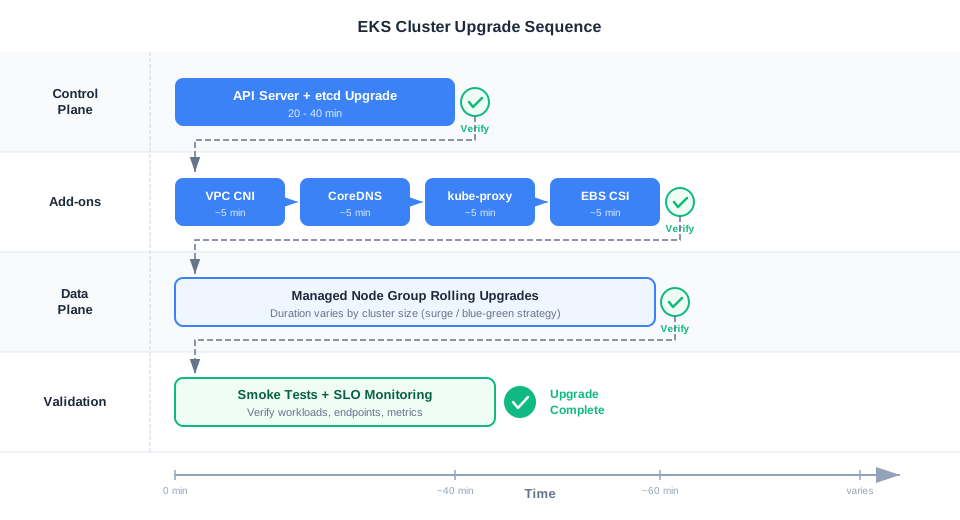
The standard upgrade sequence is:
Control Plane → Add-ons → Data Plane → Validation
The control plane goes first because nodes need to register with an API server that speaks their version. Add-ons go next because they bridge control plane and data plane functionality. Nodes go last because they depend on everything above them.
There are exceptions: certain add-on prerequisite updates (e.g., VPC CNI compatibility patches) may need to happen before the control plane upgrade. Check EKS Upgrade Insights and the EKS upgrade procedure documentation for version-specific prerequisites.
Who Manages What
| Component | AWS Manages | You Manage |
|---|---|---|
| API Server, etcd, controller-manager | Binary upgrade, HA, patching | Triggering the upgrade |
| CoreDNS | Image update (if EKS add-on) | Config (stub domains, scaling) |
| kube-proxy | Image update (if EKS add-on) | DaemonSet scheduling |
| VPC CNI (aws-node) | Image update (if EKS add-on) | ENI config, IP settings |
| EBS CSI Driver | Image update (if EKS add-on) | StorageClasses, snapshots |
| Managed Node Groups | AMI selection, launch template | Triggering upgrade, drain config |
| Self-Managed Nodes | Nothing | Everything |
| Your workloads | Nothing | Everything |
2. Pre-Flight Checks and Readiness Assessment
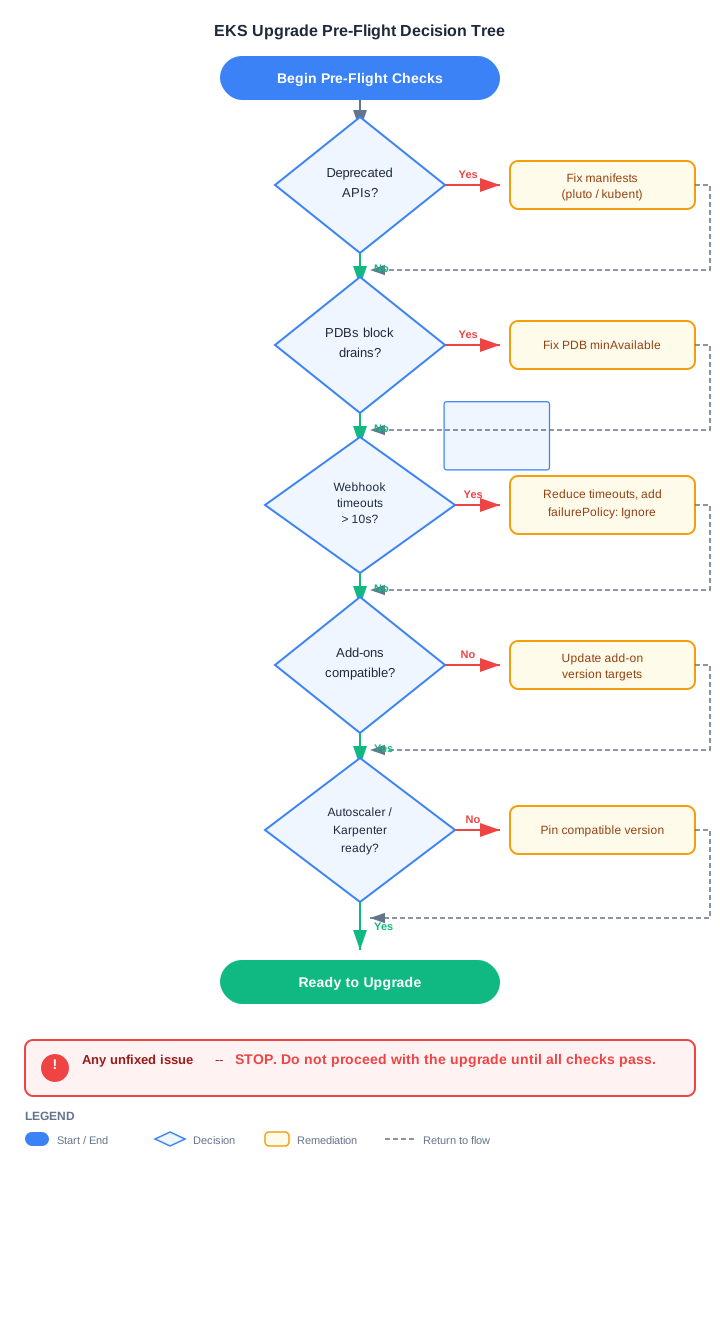
Never start an upgrade without running pre-flight checks. Many of the failure modes described later in this guide trace back to a skipped check.
EKS Upgrade Insights
Start here. EKS Upgrade Insights analyzes your cluster and reports readiness issues specific to your target version:
aws eks list-insights --cluster-name my-cluster \
  --filter 'kubernetesVersions=1.31' \
  --query 'insights[?status!=`PASSING`]' --output table
This catches deprecated API usage, add-on incompatibilities, and other issues that the generic checks below might miss.
API Deprecation Audit
Kubernetes removes APIs between minor versions. If your manifests or Helm charts reference a removed API, workloads will fail to deploy after the upgrade.
# Static analysis with pluto (scans Helm releases and live objects)
pluto detect-helm -o wide
pluto detect-api-resources -o wide

# kubent checks for upcoming deprecations
kubent
PodDisruptionBudget Review
PDBs protect your workloads during node drains. But a misconfigured PDB will block the entire upgrade.
# List all PDBs and their status
kubectl get pdb --all-namespaces -o wide

# Find PDBs that would block drains (allowed disruptions = 0)
kubectl get pdb -A -o jsonpath='{range .items[?(@.status.disruptionsAllowed==0)]}{.metadata.namespace}/{.metadata.name}{"\n"}{end}'
The most common mistake: minAvailable set to the same value as your replica count. A 3-replica deployment with minAvailable: 3 means zero pods can ever be evicted.
Webhook Audit
Custom admission webhooks with failurePolicy: Fail and long timeouts are upgrade killers. If a webhook targets pods on a node being drained, and the webhook pod itself is being drained, the API server blocks on every mutation.
# List validating webhooks with Fail policy
kubectl get validatingwebhookconfigurations -o json | \
  jq '.items[] | select(.webhooks[].failurePolicy == "Fail") | .metadata.name'

# List mutating webhooks with Fail policy
kubectl get mutatingwebhookconfigurations -o json | \
  jq '.items[] | select(.webhooks[].failurePolicy == "Fail") | .metadata.name'
Add-on Compatibility Check
# Check available versions for each add-on against your target Kubernetes version
for addon in vpc-cni coredns kube-proxy aws-ebs-csi-driver; do
  echo "=== $addon ==="
  aws eks describe-addon-versions \
    --kubernetes-version 1.31 \
    --addon-name $addon \
    --query 'addons[0].addonVersions[0:3].addonVersion' \
    --output table
done
The Pre-Flight Script
Combine all checks into a single runnable script:
#!/bin/bash
set -euo pipefail

CLUSTER="$1"
TARGET_VERSION="$2"
REGION="${3:-us-east-1}"
FAILED=0

echo "=== Pre-Flight Checks for $CLUSTER → $TARGET_VERSION (region: $REGION) ==="

# 0. Verify kubectl context matches the target cluster
CONTEXT_CLUSTER=$(kubectl config view --minify -o jsonpath='{.clusters[0].cluster.server}' 2>/dev/null || echo "")
EKS_ENDPOINT=$(aws eks describe-cluster --name "$CLUSTER" --region "$REGION" \
  --query 'cluster.endpoint' --output text 2>/dev/null || echo "")

if [ -z "$CONTEXT_CLUSTER" ] || [ -z "$EKS_ENDPOINT" ]; then
  echo "[FAIL] Cannot verify kubectl context or cluster endpoint."
  exit 1
fi

if [[ "$CONTEXT_CLUSTER" != "$EKS_ENDPOINT" ]]; then
  echo "[FAIL] kubectl context does not match cluster $CLUSTER. Update your kubeconfig."
  echo "  kubectl: $CONTEXT_CLUSTER"
  echo "  EKS:     $EKS_ENDPOINT"
  exit 1
fi

# 1. Current version
CURRENT=$(aws eks describe-cluster --name "$CLUSTER" --region "$REGION" \
  --query 'cluster.version' --output text)
echo "[INFO] Current version: $CURRENT → Target: $TARGET_VERSION"

# 2. Version skew check
CURRENT_MINOR=${CURRENT#*.}
TARGET_MINOR=${TARGET_VERSION#*.}
if (( TARGET_MINOR - CURRENT_MINOR > 1 )); then
  echo "[FAIL] Cannot skip minor versions ($CURRENT → $TARGET_VERSION)"
  FAILED=1
fi

# 3. EKS Upgrade Insights
echo "  Checking EKS Upgrade Insights..."
INSIGHT_ISSUES=$(aws eks list-insights --cluster-name "$CLUSTER" --region "$REGION" \
  --filter "kubernetesVersions=$TARGET_VERSION" \
  --query 'insights[?status!=`PASSING`]' --output json 2>/dev/null || echo "[]")

if [ "$INSIGHT_ISSUES" != "[]" ] && [ -n "$INSIGHT_ISSUES" ]; then
  echo "[WARN] EKS Upgrade Insights found issues. Review with:"
  echo "  aws eks list-insights --cluster-name $CLUSTER --region $REGION"
  FAILED=1
else
  echo "[PASS] EKS Upgrade Insights: no blocking issues found."
fi

# 4. Deprecated APIs (via metrics endpoint, if reachable)
if kubectl get --raw /metrics >/dev/null 2>&1; then
  DEPRECATED=$(kubectl get --raw /metrics | grep -c "apiserver_requested_deprecated_apis" || true)
  if [ "$DEPRECATED" -gt 0 ]; then
    echo "[WARN] Deprecated API usage detected in cluster metrics. Run: pluto detect-api-resources"
    FAILED=1
  else
    echo "[PASS] No deprecated API usage found in metrics."
  fi
else
  echo "[WARN] Cannot reach metrics endpoint. Use pluto or kubent to check for deprecated APIs."
fi

# 5. PDB check
BLOCKED_PDBS=$(kubectl get pdb -A -o jsonpath='{range .items[?(@.status.disruptionsAllowed==0)]}{.metadata.namespace}/{.metadata.name} {end}')
if [ -n "$BLOCKED_PDBS" ]; then
  echo "[WARN] PDBs blocking drains: $BLOCKED_PDBS"
  FAILED=1
else
  echo "[PASS] No PDBs blocking drains."
fi

# 6. Failing webhooks
FAIL_WEBHOOKS=$(kubectl get validatingwebhookconfigurations -o json | jq '[.items[] | select(.webhooks[].failurePolicy == "Fail")] | length')
if [ "$FAIL_WEBHOOKS" -gt 0 ]; then
  echo "[WARN] $FAIL_WEBHOOKS validating webhooks with failurePolicy: Fail"
fi

if [ "$FAILED" -eq 0 ]; then
  echo "[PASS] All pre-flight checks passed. Ready to upgrade."
else
  echo "[FAIL] Fix issues above before proceeding."
  exit 1
fi
3. Control Plane Upgrade
What AWS Actually Does
When you trigger a control plane upgrade, AWS:
- Launches new API server instances running the target Kubernetes version behind your cluster's Network Load Balancer
- Migrates etcd data to the new version
- Updates the controller-manager and scheduler
- Drains traffic from old API server instances
- Terminates old instances
Your cluster remains available throughout this process, but expect brief periods of elevated API latency during the switchover. Mutating requests may be briefly queued during etcd migration.
Executing the Upgrade
AWS CLI:
# Trigger the upgrade and capture the update ID
UPDATE_ID=$(aws eks update-cluster-version \
  --name my-cluster \
  --kubernetes-version 1.31 \
  --query 'update.id' --output text)

echo "Update ID: $UPDATE_ID"

# Monitor progress
watch -n 30 "aws eks describe-update \
  --name my-cluster \
  --update-id $UPDATE_ID \
  --query 'update.{Status:status,CreatedAt:createdAt}'"
eksctl:
eksctl upgrade cluster --name my-cluster --version 1.31 --approve
Terraform:
resource "aws_eks_cluster" "main" {
  name    = "my-cluster"
  version = "1.31" # Increment this

  role_arn = aws_iam_role.cluster.arn

  vpc_config {
    subnet_ids = var.subnet_ids
  }
}
Expect this to take 20-40 minutes. Do not panic if it takes the full 40. Check CloudTrail for
UpdateClusterVersionevents if you need detailed progress.
What Can Go Wrong
- ENI limits: The control plane creates ENIs in your VPC. If your subnet is at its ENI limit, the upgrade stalls.
- IAM permission drift: If the cluster role's permissions changed since creation, the new control plane instances may fail to assume the role.
- Custom networking conflicts: If you use custom VPC CNI networking (
AWS_VPC_K8S_CNI_CUSTOM_NETWORK_CFG), ensure your ENIConfig resources are correct before upgrading.
4. Add-on Upgrades
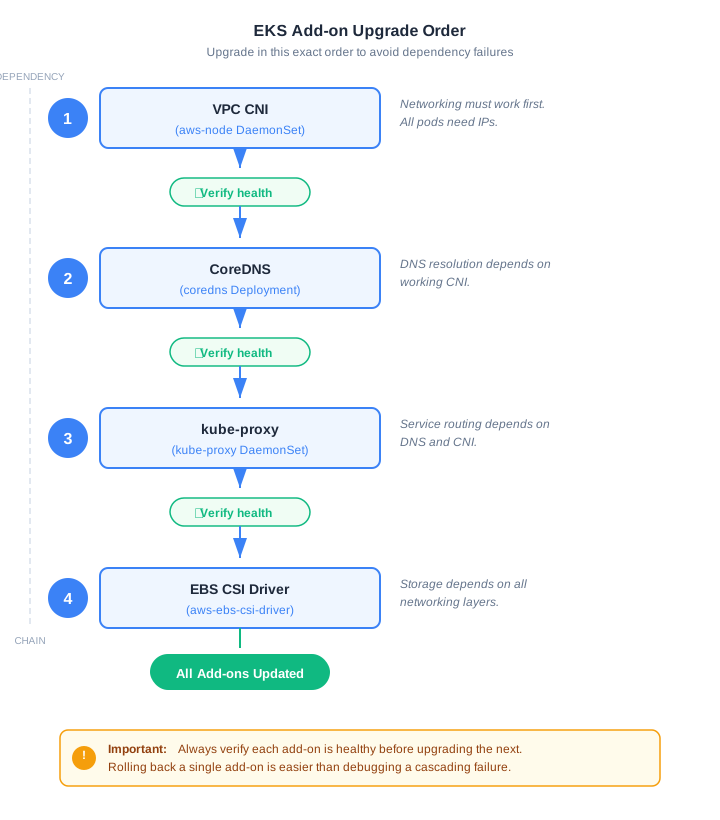
Add-on order matters. Get it wrong and you'll chase phantom networking issues for hours.
VPC CNI (aws-node) -- The Most Dangerous Add-on
The VPC CNI assigns IP addresses to pods. If it breaks during upgrade, new pods can't get IPs. Existing pods keep running, but anything that restarts or scales is dead in the water.
# Check current version and health
aws eks describe-addon --cluster-name my-cluster --addon-name vpc-cni \
  --query 'addon.{Status:status,Version:addonVersion,Health:health}'

# Back up your custom configuration BEFORE upgrading
kubectl get daemonset aws-node -n kube-system -o yaml > vpc-cni-backup.yaml

# Find compatible version
aws eks describe-addon-versions \
  --kubernetes-version 1.31 \
  --addon-name vpc-cni \
  --query 'addons[0].addonVersions[0:3]' --output table

# Upgrade (PRESERVE keeps your custom env vars)
aws eks update-addon --cluster-name my-cluster \
  --addon-name vpc-cni \
  --addon-version v1.19.0-eksbuild.1 \
  --resolve-conflicts PRESERVE
Critical: If you use
ENABLE_PREFIX_DELEGATION,WARM_ENI_TARGET, orMINIMUM_IP_TARGET, always use--resolve-conflicts PRESERVE. UsingOVERWRITEwill reset these to defaults and can cause IP exhaustion on large clusters.
CoreDNS
# Back up CoreDNS ConfigMap (contains custom stub domains, forward rules)
kubectl get configmap coredns -n kube-system -o yaml > coredns-configmap-backup.yaml

# Upgrade
aws eks update-addon --cluster-name my-cluster \
  --addon-name coredns \
  --addon-version v1.11.3-eksbuild.2 \
  --resolve-conflicts PRESERVE

# Verify DNS is working after upgrade
kubectl run dns-test --image=busybox:1.36 --rm -it --restart=Never -- nslookup kubernetes.default
Scale CoreDNS before the upgrade if you're running a large cluster. Two replicas serving 500 nodes during a rolling restart is asking for DNS timeouts.
kube-proxy
aws eks update-addon --cluster-name my-cluster \
  --addon-name kube-proxy \
  --addon-version v1.31.2-eksbuild.3 \
  --resolve-conflicts PRESERVE
kube-proxy runs as a DaemonSet. During upgrade, pods restart one node at a time. If you're using IPVS mode, verify IPVS rules are correctly reprogrammed after the rollout:
kubectl rollout status daemonset/kube-proxy -n kube-system --timeout=300s
EBS CSI Driver
aws eks update-addon --cluster-name my-cluster \
  --addon-name aws-ebs-csi-driver \
  --addon-version v1.37.0-eksbuild.1 \
  --resolve-conflicts PRESERVE
Verify volume operations work after the upgrade. Note that if your default StorageClass uses volumeBindingMode: WaitForFirstConsumer, PVCs won't bind until a pod consumes them:
# Check CSI driver pods
kubectl get pods -n kube-system -l app=ebs-csi-controller

# Create a test PVC and pod to verify end-to-end volume binding
kubectl apply -f - <<EOF
apiVersion: v1
kind: PersistentVolumeClaim
metadata:
  name: upgrade-test-pvc
spec:
  accessModes: [ReadWriteOnce]
  resources:
    requests:
      storage: 1Gi
  storageClassName: gp3
---
apiVersion: v1
kind: Pod
metadata:
  name: upgrade-test-pod
spec:
  containers:
  - name: test
    image: busybox:1.36
    command: ["sleep", "30"]
    volumeMounts:
    - name: test-vol
      mountPath: /data
  volumes:
  - name: test-vol
    persistentVolumeClaim:
      claimName: upgrade-test-pvc
  restartPolicy: Never
EOF

# Wait for pod to start (triggers PVC binding)
kubectl wait --for=condition=Ready pod/upgrade-test-pod --timeout=120s

# Verify PVC is bound
kubectl get pvc upgrade-test-pvc -o jsonpath='Phase: {.status.phase}{"\n"}'

# Clean up
kubectl delete pod upgrade-test-pod
kubectl delete pvc upgrade-test-pvc
Add-on Version Compatibility
| Add-on | K8s 1.29 | K8s 1.30 | K8s 1.31 |
|---|---|---|---|
| VPC CNI | v1.16.x - v1.18.x | v1.17.x - v1.19.x | v1.18.x - v1.19.x |
| CoreDNS | v1.10.1 | v1.11.1 | v1.11.3 |
| kube-proxy | v1.29.x | v1.30.x | v1.31.x |
| EBS CSI | v1.28.x - v1.31.x | v1.29.x - v1.32.x | v1.30.x - v1.37.x |
Always verify exact versions against AWS documentation before upgrading. Use aws eks describe-addon-versions for your specific Kubernetes version.
Self-Managed vs EKS-Managed Add-ons
| Aspect | EKS-Managed | Self-Managed (Helm) |
|---|---|---|
| Upgrade mechanism | aws eks update-addon | helm upgrade |
| Version pinning | Explicit version in API | Chart version |
| Custom config | configurationValues JSON | Full values.yaml control |
| Conflict handling | OVERWRITE / PRESERVE | Manual merge |
| Rollback | aws eks update-addon to prev version | helm rollback |
| Best for | Standard setups, less ops overhead | Heavy customization |
5. Node Group Upgrades
This is where the real risk lives. Control plane upgrades are AWS's problem. Node upgrades are yours.
Rolling Update (Managed Node Groups)
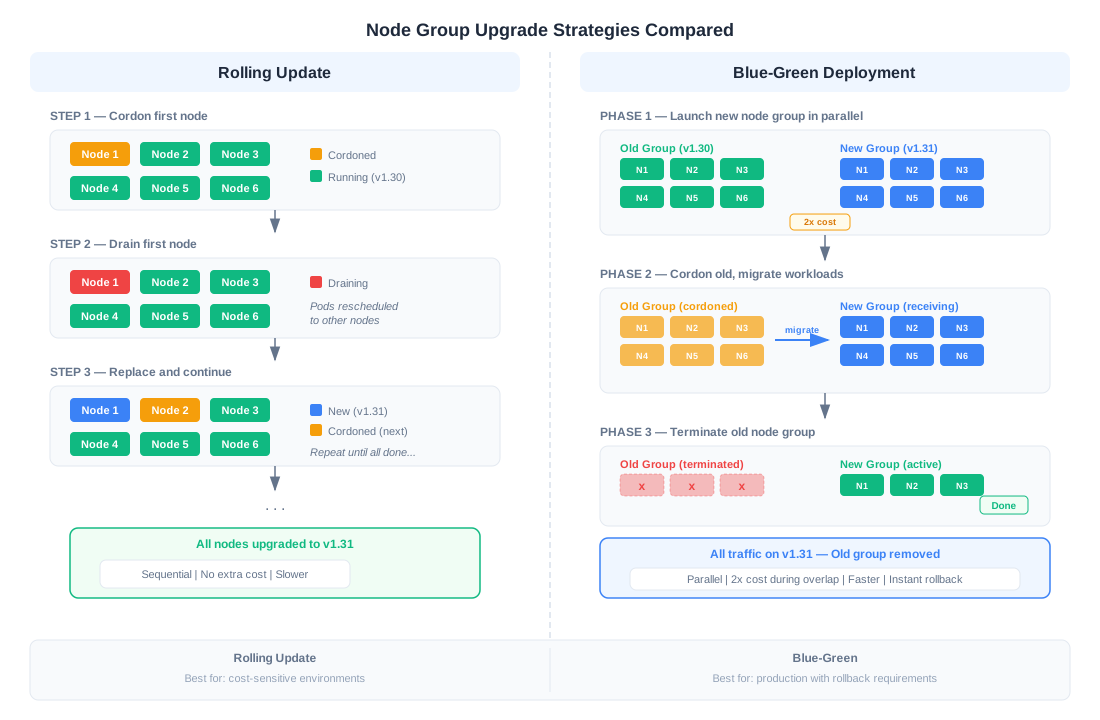
The default strategy. EKS cordons a node, drains it (respecting PDBs), terminates the EC2 instance, and launches a replacement with the new AMI.
# Trigger rolling update
aws eks update-nodegroup-version \
  --cluster-name my-cluster \
  --nodegroup-name workers \
  --kubernetes-version 1.31

# Or with eksctl
eksctl upgrade nodegroup --cluster my-cluster --name workers --kubernetes-version 1.31
You can control the blast radius with updateConfig:
aws eks update-nodegroup-config \
  --cluster-name my-cluster \
  --nodegroup-name workers \
  --update-config '{"maxUnavailable": 1}'
Note: The default managed node group rolling update behavior launches new instances before terminating old ones, which means temporary extra capacity cost during the upgrade window.
Blue-Green Node Group Strategy
The safer approach for production-critical clusters. Create a new node group, migrate workloads, validate, then retire the old group.
# 1. Create new node group with target version
eksctl create nodegroup --cluster my-cluster \
  --name workers-v131 \
  --version 1.31 \
  --node-type m5.xlarge \
  --nodes-min 3 --nodes-max 10

# 2. Wait for new nodes to be Ready
kubectl wait --for=condition=Ready nodes -l eks.amazonaws.com/nodegroup=workers-v131 --timeout=600s

# 3. Cordon old nodes (prevent new scheduling)
kubectl cordon -l eks.amazonaws.com/nodegroup=workers-v130

# 4. Drain old nodes (migrate workloads)
for node in $(kubectl get nodes -l eks.amazonaws.com/nodegroup=workers-v130 -o name); do
  kubectl drain "$node" \
    --ignore-daemonsets \
    --delete-emptydir-data \
    --timeout=300s \
    --grace-period=60
done

# 5. Verify workloads are running on new nodes
echo "Pods still on old nodes:"
kubectl get pods -A -o wide --field-selector status.phase=Running \
  | awk 'NR==1 || /workers-v130/'

# 6. Validate application health (run your smoke tests here)
# ... wait for bake period ...

# 7. Delete old node group AFTER validation period
eksctl delete nodegroup --cluster my-cluster --name workers-v130
Terraform blue-green pattern:
In Terraform, both node groups must coexist in the configuration during migration. Use desired_size to control which is active rather than conditionally creating/destroying groups:
variable "blue_version" {
  description = "Kubernetes version for blue node group"
  default     = "1.30"
}

variable "green_version" {
  description = "Kubernetes version for green node group"
  default     = "1.31"
}

# During migration: both have desired_size > 0
# After validation: set old group desired_size to 0
# After cleanup: remove old group resource entirely
variable "blue_desired_size" { default = 0 }  # Retired after migration
variable "green_desired_size" { default = 6 } # Active group

resource "aws_eks_node_group" "blue" {
  cluster_name    = aws_eks_cluster.main.name
  node_group_name = "workers-blue"
  version         = var.blue_version

  scaling_config {
    desired_size = var.blue_desired_size
    max_size     = var.max_size
    min_size     = 0
  }

  node_role_arn = aws_iam_role.node.arn
  subnet_ids   = var.private_subnet_ids
}

resource "aws_eks_node_group" "green" {
  cluster_name    = aws_eks_cluster.main.name
  node_group_name = "workers-green"
  version         = var.green_version

  scaling_config {
    desired_size = var.green_desired_size
    max_size     = var.max_size
    min_size     = 0
  }

  node_role_arn = aws_iam_role.node.arn
  subnet_ids   = var.private_subnet_ids
}
The lifecycle for a blue-green upgrade in Terraform:
- Set both groups to non-zero
desired_size(both running) - Cordon and drain the old group (outside Terraform)
- Validate workloads on the new group
- Set old group
desired_sizeto 0 - After confidence period, remove the old group resource
Rolling vs Blue-Green: When to Use Which
| Factor | Rolling Update | Blue-Green |
|---|---|---|
| Downtime risk | Low (per-pod disruption) | Near-zero |
| Cost during upgrade | Temporary extra capacity (new nodes launch before old ones terminate) | 2x node cost during overlap |
| Upgrade speed | Slower (sequential) | Faster (parallel) |
| Rollback speed | Slow (must recreate old group) | Fast (uncordon old group) |
| Complexity | Low | Medium |
| Best for | Cost-sensitive, dev/staging | Production-critical workloads |
Handling Stuck Drains
When kubectl drain hangs, it's almost always one of these:
- PDB with
minAvailabletoo high -- reduce the PDB, drain, restore it - Pods without controllers (bare pods) -- use
--forceto delete them, but understand they won't be rescheduled - Local storage pods -- use
--delete-emptydir-data(data will be lost) - Pods with very long
terminationGracePeriodSeconds-- reduce--grace-periodor wait
# Find what's blocking the drain
kubectl get pods --field-selector spec.nodeName=<stuck-node> -A \
  -o custom-columns=NS:.metadata.namespace,NAME:.metadata.name,PDB:'' | head -20

# Nuclear option (last resort): force drain
kubectl drain <node> --force --ignore-daemonsets --delete-emptydir-data --grace-period=30
6. Self-Managed Node Upgrades
If you're running self-managed nodes (GPU instances, Bottlerocket, custom kernel configs), the upgrade is entirely on you.
Finding the Right AMI
# EKS-optimized AL2023 AMI
aws ssm get-parameter \
  --name /aws/service/eks/optimized-ami/1.31/amazon-linux-2023/x86_64/standard/recommended/image_id \
  --query 'Parameter.Value' --output text

# Bottlerocket AMI
aws ssm get-parameter \
  --name /aws/service/bottlerocket/aws-k8s-1.31/x86_64/latest/image_id \
  --query 'Parameter.Value' --output text

# GPU-optimized AMI
aws ssm get-parameter \
  --name /aws/service/eks/optimized-ami/1.31/amazon-linux-2023/x86_64/nvidia/recommended/image_id \
  --query 'Parameter.Value' --output text
ASG Instance Refresh
Update your launch template with the new AMI, then trigger an instance refresh:
aws autoscaling start-instance-refresh \
  --auto-scaling-group-name my-eks-asg \
  --preferences '{
    "MinHealthyPercentage": 90,
    "InstanceWarmup": 300,
    "CheckpointPercentages": [20, 50, 100],
    "CheckpointDelay": 300
  }'
The checkpoint percentages give you natural pause points. After 20% of instances are refreshed, the process pauses for 5 minutes so you can check that workloads are healthy before continuing.
Karpenter Drift Detection
If you use Karpenter, update the EC2NodeClass AMI family or specify the new AMI ID, and Karpenter's drift detection will automatically replace nodes:
apiVersion: karpenter.k8s.aws/v1
kind: EC2NodeClass
metadata:
  name: default
spec:
  amiFamily: AL2023
  # Karpenter will detect drift when the latest AMI
  # for your Kubernetes version changes
  amiSelectorTerms:
    - alias: al2023@v20261015
7. Rollback Strategies
Control Plane Rollback
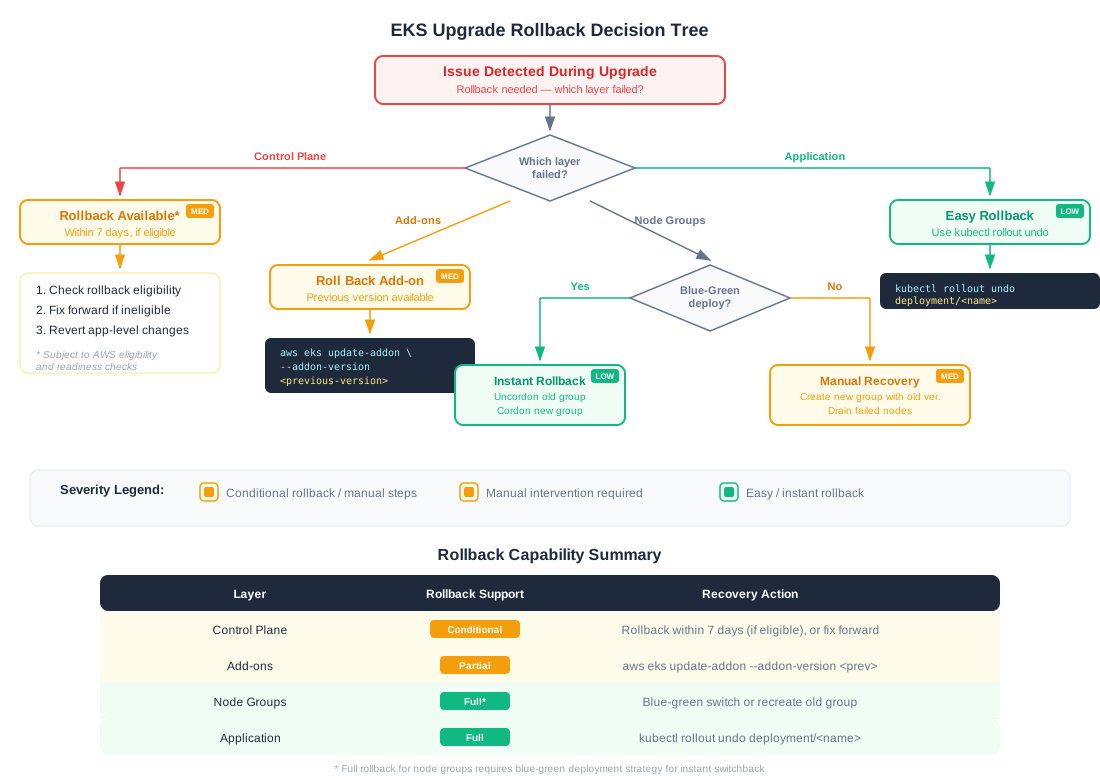
AWS supports rolling back an EKS control plane to the previous minor version within seven days of the upgrade, subject to eligibility and readiness checks. This is a significant safety net, but it has constraints:
- The cluster must pass AWS's rollback readiness checks
- Workloads that depend on APIs or features introduced in the new version will break on rollback
- Add-ons and node groups are not automatically rolled back with the control plane
# Check rollback eligibility (if supported for your cluster)
aws eks describe-cluster --name my-cluster \
  --query 'cluster.{Version:version,Status:status}'
Because of these constraints, fixing forward is still the preferred strategy for most production issues. Rollback is best reserved for cases where the upgrade itself introduced a fundamental incompatibility that can't be resolved quickly.
What Else You Can Roll Back
Add-ons:
# Roll back VPC CNI to previous version
aws eks update-addon --cluster-name my-cluster \
  --addon-name vpc-cni \
  --addon-version v1.18.5-eksbuild.1 \
  --resolve-conflicts OVERWRITE
Node groups (blue-green makes this straightforward):
# Uncordon old nodes
kubectl uncordon -l eks.amazonaws.com/nodegroup=workers-v130

# Cordon new nodes
kubectl cordon -l eks.amazonaws.com/nodegroup=workers-v131

# Drain new nodes back to old
for node in $(kubectl get nodes -l eks.amazonaws.com/nodegroup=workers-v131 -o name); do
  kubectl drain "$node" --ignore-daemonsets --delete-emptydir-data --timeout=300s
done
This is why the blue-green pattern recommends keeping the old node group running through a validation period rather than deleting it immediately.
Application deployments:
kubectl rollout undo deployment/my-app -n production
kubectl rollout undo deployment/my-app -n production --to-revision=3
The Forward Fix Mindset
Even with rollback available, fixing forward is often faster for issues that aren't caused by the Kubernetes version change itself. This requires:
- Observability -- you need to know something is wrong within minutes, not hours
- Runbooks -- pre-written procedures for common failure modes
- Communication -- your team knows the upgrade is happening and is on standby
8. Common Anti-Patterns
Ten patterns that commonly lead to upgrade incidents. The scenarios described here are illustrative, based on commonly observed failure modes.
1. Upgrade Nodes Before the Control Plane
What happens: Kubelet on the new nodes tries to register with an API server running an older version. Registration may fail or behave unpredictably. Nodes enter NotReady state. Pod scheduling stops.
The fix: Always upgrade the control plane first.
2. Skip Minor Versions
What happens: Kubernetes removes APIs between versions. Jumping from 1.28 to 1.30 means you hit API removals for both 1.29 and 1.30 simultaneously. Your CI/CD manifests, Helm charts, and admission webhooks all break at once.
The fix: Upgrade one minor version at a time. Test each step.
3. Use --resolve-conflicts OVERWRITE Without Backing Up Config
What happens: Your custom CoreDNS forward rules for internal DNS? Gone. Your VPC CNI ENABLE_PREFIX_DELEGATION=true that prevents IP exhaustion on your large cluster? Reset to defaults. You find out when pods stop getting IP addresses.
The fix: Always kubectl get -o yaml your add-on configs before upgrading. Use PRESERVE unless you specifically need OVERWRITE.
4. Skip the PDB Audit
Scenario: A 3-replica deployment with minAvailable: 3. During the node group upgrade, every drain operation hangs because no pod can be evicted. With per-node drain timeouts, the upgrade stalls for hours before someone notices.
The fix: Run kubectl get pdb -A -o wide and verify ALLOWED DISRUPTIONS is greater than 0 for every PDB.
5. Upgrade on Friday
You know better. Do it Tuesday or Wednesday morning when you have the full week to monitor.
6. Forget to Update Client Tools
What happens: kubectl 1.28 talking to a 1.31 API server returns confusing errors. helm template renders manifests against the wrong API versions. eksctl may not support features available in the new version.
The fix: Update kubectl, helm, and eksctl before you start the upgrade. Match kubectl to within one minor version of your target.
7. Ignore Webhook Timeout Configurations
What happens: You have a ValidatingWebhookConfiguration with timeoutSeconds: 30 and failurePolicy: Fail that targets all pod CREATE operations. The webhook server runs as a pod in the cluster. During node drain, the webhook pod gets evicted. Now every pod creation attempt hangs for 30 seconds and then fails. The API server latency spikes. Health checks fail. Cascading failure.
The fix: Set webhook timeouts to 5-10 seconds maximum. Use failurePolicy: Ignore for non-critical webhooks. Ensure webhook servers have PDBs and run on nodes that aren't being drained.
8. Skip Non-Production Testing
"It worked in the blog post" is not a test plan. Upgrade your dev cluster first. Then staging. Then production. Every single time.
9. Run Upgrades Without Monitoring
Scenario: You trigger the upgrade and walk away. CoreDNS is overwhelmed because you only had 2 replicas serving 300 nodes during the rollout. DNS resolution is timing out. Applications throw "connection refused" errors that look like application bugs, not infrastructure bugs. Without a monitoring dashboard open, it can take a long time to trace the symptoms back to the upgrade.
The fix: Have a dedicated monitoring dashboard open during every upgrade. Watch API server latency (p99), DNS resolution time, pod scheduling latency, and node readiness.
10. Upgrade All Clusters Simultaneously
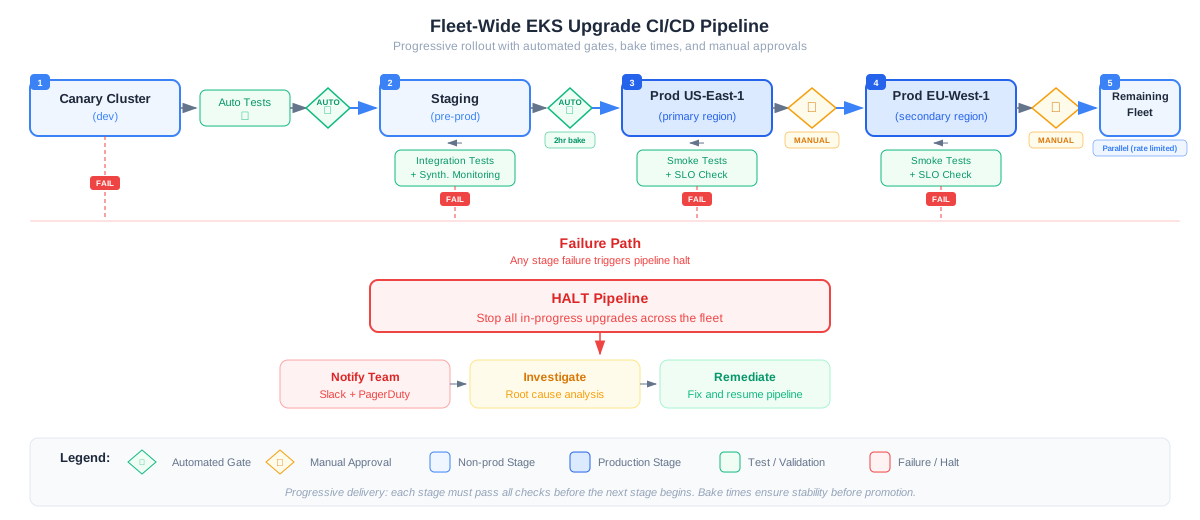
Fleet upgrades must be staged. The canary cluster catches issues that your test suite missed. The staging cluster catches issues that only appear under realistic traffic patterns. Production clusters get upgraded one region at a time with manual approval gates.
Illustrative Scenario: VPC CNI Configuration Reset
A platform team upgrades VPC CNI across a large cluster using --resolve-conflicts OVERWRITE. This resets WARM_ENI_TARGET from 0 (with prefix delegation) to the default 1. Each node starts pre-allocating a full ENI worth of IPs. The subnet runs out of IPs. New pods enter ContainerCreating and never progress. The team spends hours debugging "pod networking issues" before realizing the CNI config had been reset. The root cause is OVERWRITE; the fix is restoring the backup.
Illustrative Scenario: CoreDNS Under-Scaling
During an add-on update, a cluster's CoreDNS deployment runs only 2 replicas for a large node count. The upgrade triggers a rolling restart. Briefly, only 1 CoreDNS pod is serving requests. DNS query latency spikes from 2ms to hundreds of milliseconds. Health check endpoints that rely on DNS start failing. Load balancers remove healthy backends. The symptoms look like application bugs, not infrastructure bugs. The root cause is insufficient CoreDNS replicas during the rollout; the fix is pre-scaling CoreDNS before the upgrade.
9. Automation for Fleet Upgrades
Manual upgrades don't scale past a handful of clusters. Here's how to automate.
The Fleet Upgrade Pipeline
A production-grade fleet upgrade follows this pattern:
- Canary cluster (dev environment) -- auto-promoted if all tests pass
- Staging cluster -- auto-promoted after a bake time with synthetic traffic
- First production cluster -- manual approval gate before the upgrade starts
- Remaining production clusters -- manual approval, one region at a time
Fleet Upgrade Script
This script is a starting point. Adapt it to your environment with proper CI/CD integration, secret management, and alerting.
#!/bin/bash
set -euo pipefail

# Configuration
CLUSTERS=("dev-us-east-1" "staging-us-east-1" "prod-us-east-1" "prod-eu-west-1")
REGIONS=("us-east-1" "us-east-1" "us-east-1" "eu-west-1")
TARGET_VERSION="1.31"
SLACK_WEBHOOK="${SLACK_WEBHOOK_URL}"

notify() {
  curl -s -X POST "$SLACK_WEBHOOK" \
    -H 'Content-Type: application/json' \
    -d "{\"text\": \"[EKS Fleet Upgrade] $1\"}" > /dev/null
}

wait_for_cluster_active() {
  local cluster="$1" region="$2"
  echo "  Waiting for cluster to reach ACTIVE status..."
  while true; do
    STATUS=$(aws eks describe-cluster --name "$cluster" --region "$region" \
      --query 'cluster.status' --output text)
    [ "$STATUS" = "ACTIVE" ] && break
    sleep 30
  done
}

wait_for_nodegroup_active() {
  local cluster="$1" region="$2" ng="$3"
  echo "  Waiting for node group $ng to finish updating..."
  while true; do
    STATUS=$(aws eks describe-nodegroup --cluster-name "$cluster" --region "$region" \
      --nodegroup-name "$ng" --query 'nodegroup.status' --output text)
    [ "$STATUS" = "ACTIVE" ] && break
    if [ "$STATUS" = "DEGRADED" ] || [ "$STATUS" = "DELETE_FAILED" ]; then
      echo "  [ERROR] Node group $ng entered $STATUS state"
      return 1
    fi
    sleep 30
  done
}

upgrade_addons() {
  local cluster="$1" region="$2"
  for addon in vpc-cni coredns kube-proxy aws-ebs-csi-driver; do
    LATEST=$(aws eks describe-addon-versions \
      --kubernetes-version "$TARGET_VERSION" \
      --addon-name "$addon" \
      --query 'addons[0].addonVersions[0].addonVersion' --output text 2>/dev/null)
    [ "$LATEST" = "None" ] && continue

    echo "  Updating $addon to $LATEST ..."
    aws eks update-addon --cluster-name "$cluster" --region "$region" \
      --addon-name "$addon" \
      --addon-version "$LATEST" \
      --resolve-conflicts PRESERVE

    # Wait for addon to be ACTIVE
    while true; do
      ADDON_STATUS=$(aws eks describe-addon --cluster-name "$cluster" --region "$region" \
        --addon-name "$addon" --query 'addon.status' --output text)
      [ "$ADDON_STATUS" = "ACTIVE" ] && break
      if [ "$ADDON_STATUS" = "DEGRADED" ]; then
        echo "  [ERROR] Add-on $addon entered DEGRADED state"
        notify "FAILED: Add-on $addon degraded on $cluster"
        exit 1
      fi
      sleep 15
    done
    echo "  $addon updated successfully."
  done
}

verify_workloads() {
  local cluster="$1" region="$2"
  echo "  Verifying workloads..."
  aws eks update-kubeconfig --name "$cluster" --region "$region" --alias "$cluster"

  # Check node readiness
  NOT_READY=$(kubectl --context "$cluster" get nodes --no-headers | grep -cv " Ready " || true)
  if [ "$NOT_READY" -gt 0 ]; then
    echo "  [WARN] $NOT_READY nodes are not Ready"
    return 1
  fi

  # Check for crashing pods
  CRASH_LOOPS=$(kubectl --context "$cluster" get pods -A --no-headers | grep -c "CrashLoopBackOff" || true)
  if [ "$CRASH_LOOPS" -gt 0 ]; then
    echo "  [WARN] $CRASH_LOOPS pods in CrashLoopBackOff"
    return 1
  fi

  echo "  Workload verification passed."
  return 0
}

for i in "${!CLUSTERS[@]}"; do
  cluster="${CLUSTERS[$i]}"
  region="${REGIONS[$i]}"

  echo "=== Upgrading $cluster ($region) to $TARGET_VERSION ==="

  # Manual approval gate BEFORE production upgrades
  if [[ "$cluster" == prod-* ]]; then
    notify "Awaiting manual approval to upgrade $cluster. Check dashboards before approving."
    echo "  [GATE] Production cluster. Press ENTER to proceed with upgrade..."
    read -r
  fi

  # Set kubectl context
  aws eks update-kubeconfig --name "$cluster" --region "$region" --alias "$cluster"

  # Pre-flight
  notify "Starting pre-flight checks: $cluster"
  ./preflight-check.sh "$cluster" "$TARGET_VERSION" "$region" || {
    notify "FAILED: Pre-flight checks failed for $cluster"
    exit 1
  }

  # Control plane
  notify "Upgrading control plane: $cluster → $TARGET_VERSION"
  aws eks update-cluster-version \
    --name "$cluster" \
    --region "$region" \
    --kubernetes-version "$TARGET_VERSION" > /dev/null

  echo "  Control plane upgrade initiated. Waiting..."
  wait_for_cluster_active "$cluster" "$region"
  echo "  Control plane upgraded."

  # Add-ons
  upgrade_addons "$cluster" "$region"

  # Node groups (wait for each to complete)
  for ng in $(aws eks list-nodegroups --cluster-name "$cluster" --region "$region" \
    --query 'nodegroups[]' --output text); do
    echo "  Upgrading node group: $ng"
    aws eks update-nodegroup-version \
      --cluster-name "$cluster" \
      --region "$region" \
      --nodegroup-name "$ng" \
      --kubernetes-version "$TARGET_VERSION" > /dev/null

    wait_for_nodegroup_active "$cluster" "$region" "$ng" || {
      notify "FAILED: Node group $ng failed on $cluster"
      exit 1
    }
    echo "  Node group $ng upgraded."
  done

  # Verify workloads after all components are upgraded
  verify_workloads "$cluster" "$region" || {
    notify "WARNING: Workload verification issues on $cluster. Manual review needed."
    echo "  [WARN] Workload issues detected. Press ENTER to continue or Ctrl+C to abort..."
    read -r
  }

  notify "SUCCESS: $cluster fully upgraded to $TARGET_VERSION and verified."
  echo "  $cluster upgrade complete."
  echo ""
done

notify "Fleet upgrade complete. All clusters on $TARGET_VERSION."
Terraform Module Pattern
For teams using Terraform, encapsulate the upgrade sequence in a module:
module "eks_upgrade" {
  source = "./modules/eks-upgrade"

  cluster_name       = "my-cluster"
  kubernetes_version = "1.31"
  node_group_strategy = "blue-green" # or "rolling"

  addon_versions = {
    vpc-cni            = "v1.19.0-eksbuild.1"
    coredns            = "v1.11.3-eksbuild.2"
    kube-proxy         = "v1.31.2-eksbuild.3"
    aws-ebs-csi-driver = "v1.37.0-eksbuild.1"
  }

  node_groups = {
    workers = {
      instance_types = ["m5.xlarge"]
      desired_size   = 6
      min_size       = 3
      max_size       = 12
    }
  }
}
10. Observability Checklist During Upgrades
Keep a dashboard open with these metrics during every upgrade:
Critical Metrics
| Metric | Source | Alert Threshold |
|---|---|---|
| API server request latency (p99) | CloudWatch / Prometheus | > 1s |
| API server error rate (5xx) | CloudWatch | > 1% |
| etcd leader changes | Prometheus | > 0 during upgrade |
| Pod scheduling latency | kube-scheduler metrics | > 5s |
| DNS resolution time | CoreDNS metrics | > 100ms |
| Node NotReady count | Kubernetes API | > 0 (unexpected) |
| CNI errors | VPC CNI metrics | > 0 |
| PVC binding time | CSI metrics | > 30s |
Suggested CloudWatch Alarms
# API server availability
aws cloudwatch put-metric-alarm \
  --alarm-name "eks-upgrade-api-server-errors" \
  --metric-name "cluster_failed_request_count" \
  --namespace "ContainerInsights" \
  --statistic Sum \
  --period 60 \
  --evaluation-periods 3 \
  --threshold 10 \
  --comparison-operator GreaterThanThreshold \
  --dimensions Name=ClusterName,Value=my-cluster
11. The Complete Upgrade Checklist
- Review EKS Upgrade Insights for your cluster and target version
- Read the EKS release notes for the target version
- Run pre-flight checks (deprecated APIs, PDBs, webhooks, add-on compatibility)
- Update client tools (kubectl, helm, eksctl)
- Back up add-on configurations (
kubectl get -o yaml) - Upgrade the control plane and wait for ACTIVE status
- Upgrade add-ons in order: VPC CNI → CoreDNS → kube-proxy → EBS CSI
- Verify add-on health after each one
- Upgrade node groups (rolling or blue-green based on your risk tolerance)
- Run smoke tests (DNS, pod scheduling, volume binding, application health)
- Monitor for a bake period before declaring success
- Update your runbooks with anything you learned
- Move to the next cluster in your fleet
EKS upgrades are essential platform work. A well-prepared upgrade is routine; a poorly prepared one can take down your entire platform. The difference is preparation: running the pre-flight checks, choosing the right node upgrade strategy, keeping rollback options available, and knowing what to do when things go sideways.
Invest in the process. Reliable platforms are built on reliable upgrade practices.
Quick knowledge check — Kubernetes
5 free CKA questions, instant feedback.
Test what you just read
Check your Kubernetes knowledge with 5 free practice questions from the Certified Kubernetes Administrator (CKA) exam. Instant answers and explanations, no account needed.
Start the free quiz